Online booking software for hair salons
tilkbook lets salon owners take bookings 24/7, reduce no-shows with automated reminders, and keep every stylist's calendar in sync. Built for the way salons actually work — service variations per stylist, deposits, and double-booking protection.
Why does online booking for hair salons need to be different?
No-shows kill chair revenue
A balayage or colour treatment runs two to three hours. A single no-show at 9am leaves the chair empty for the rest of the morning — and there is no time to fill it. Deposits and automated reminders close that gap before the client even books.
DM bookings get lost outside business hours
Instagram DMs and text threads pile up overnight. Clients who message at 11pm want an answer now — not the next morning. A 24/7 booking link sends them straight to a live schedule that respects each stylist's hours.
Each stylist has different services and prices
A senior stylist charges more for balayage than a junior. A master stylist may offer extensions while a new hire does not. One flat service list does not work — every booking system needs per-stylist menus, not one shared catalogue.
What features matter for hair salons?
Per-stylist menus and calendars
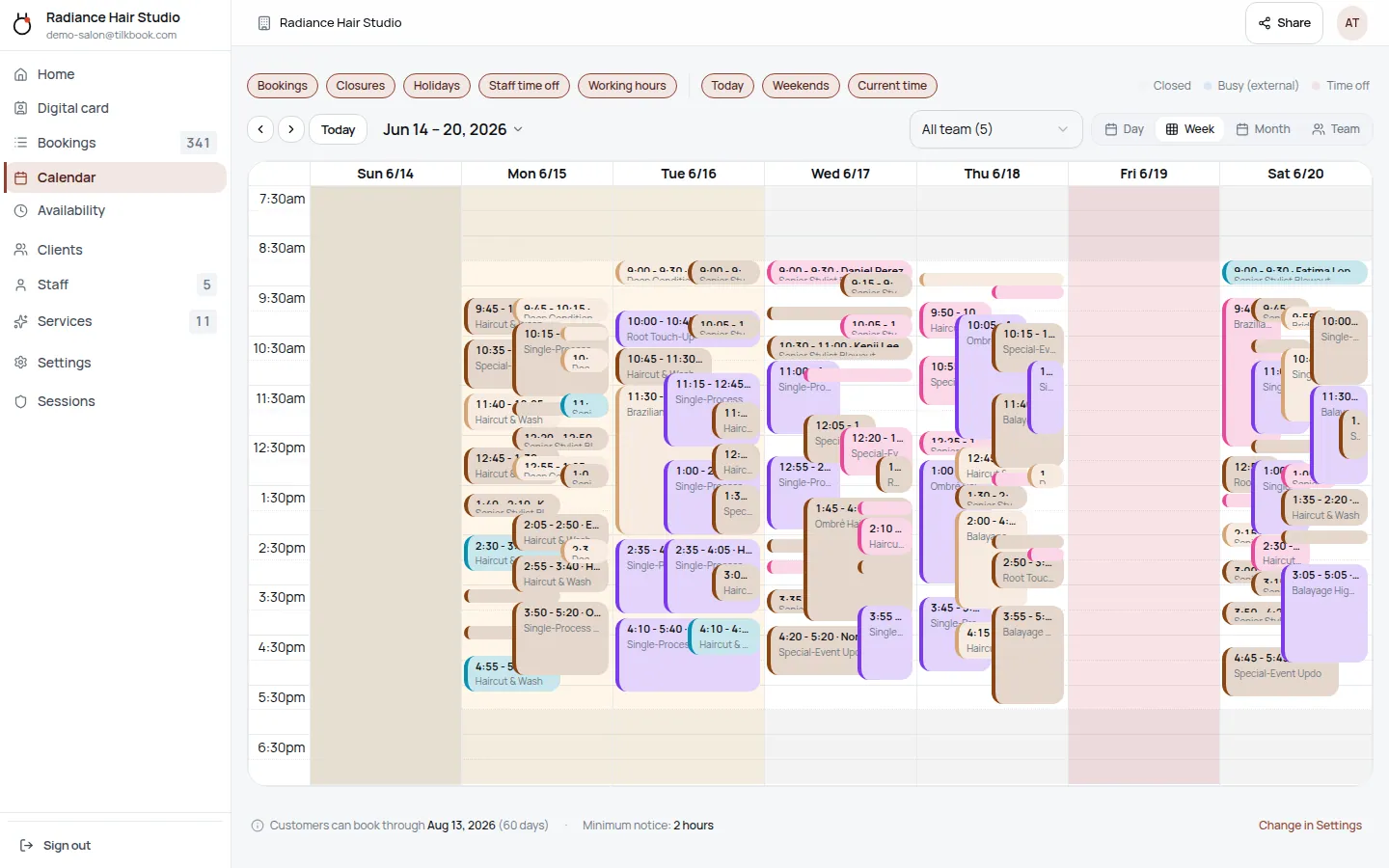
Each stylist sets their own services, durations, and prices. Clients pick the stylist first, then see only that stylist's available slots. Senior stylist rates, junior rates, and chair-rental barbers each live in their own calendar.
Email & SMS reminders
Booking confirmations and email reminders go out automatically on every plan. SMS text reminders — which consistently hit 98% open rates — are available as a paid upgrade.
Deposits and no-show fees
Require a card deposit at booking to hold the chair for long colour appointments. If a client cancels inside the window or does not show, the no-show fee charges automatically via Stripe. Both require the optional payments add-on.
Waitlist for popular stylists
When a client cancels, tilkbook automatically notifies the next person on the waitlist with a claim link. Popular stylists fill gaps without any manual follow-up.
Digital business cards for every stylist
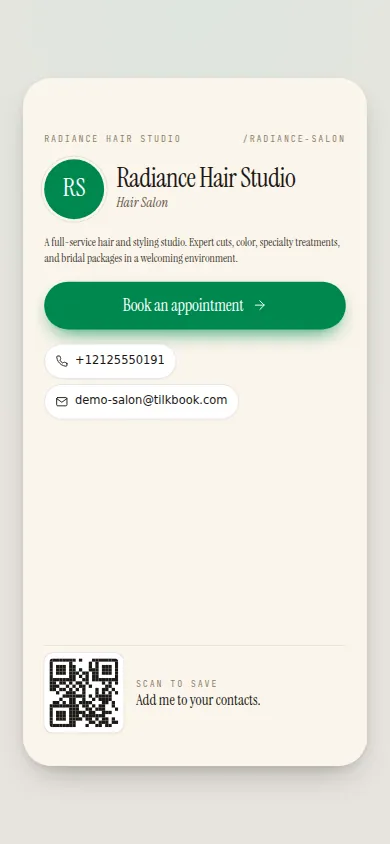
Every stylist gets a personal digital business card with a short link and NFC-tap support. Share it on Instagram, tap-to-share on a phone, or print a QR code at the reception desk — each card links directly to that stylist's booking page.
Google Calendar sync
Two-way sync with Google Calendar blocks off personal commitments and writes new bookings back automatically. Staff can also connect any iCal feed — Outlook public links, Apple Calendar — to keep all their calendars in one place.
tilkbook is free booking software built for multi-stylist hair salons. Clients visit your booking page at any hour, pick their stylist, choose a service — balayage, cut + colour, root touch-up, extensions — and lock in a time without calling or DMing. The system checks each stylist’s real availability in real time, so double-booking is impossible. Booking confirmations land in the client’s inbox immediately, and automated email reminders go out before the appointment on every plan, free. For salons that want stronger no-show protection on long colour appointments, SMS reminders are available as a paid upgrade, and a Stripe-powered payments add-on enables deposits and no-show fees. The setup checklist — add services, invite stylists, set hours — takes most salons under 30 minutes. No credit card required to go live. Competitors like Vagaro, Booksy, Fresha, StyleSeat, Setmore, and Acuity Scheduling all charge monthly fees or take a cut of each booking; tilkbook’s core scheduling is free.
How does tilkbook handle multiple stylists with different services?
Each stylist on tilkbook has their own profile, their own service menu, and their own availability calendar. When a client opens the salon’s booking page, they choose the stylist first. After that, they only see the services that particular stylist offers — with that stylist’s prices and durations.
This matters because salon pricing is not flat. A senior stylist’s balayage takes three hours and costs accordingly. A junior stylist may offer highlights and a blowout but not full colour treatments. A master stylist might offer extensions while a new hire sticks to base colour and cut + colour. One shared service catalogue does not reflect that reality. tilkbook’s per-stylist model does.
The owner builds the master service list once — base colour, balayage, highlights, face framing, ombre, keratin, blowout, cut + colour, toning, extensions — and then assigns the relevant services to each staff member. When a stylist changes their pricing or drops a service, they update their own profile without touching anyone else’s calendar.
Staff cards extend this further: each stylist’s digital business card links directly to their personal booking page. A stylist can share their card on Instagram Stories, tap it via NFC at a phone-to-phone handoff, or embed a QR code at their station. Clients who follow a specific stylist book that person directly rather than going through the salon’s main page.
Can I charge a deposit for colour appointments?
Yes. tilkbook supports deposits on any service through the optional Stripe-powered payments add-on. When a client books a balayage or an extensions appointment, they enter a card at checkout and the deposit is captured immediately. The remaining balance is settled at the chair, however the salon handles it.
The deposit amount is configurable per service. A salon might require a deposit for any appointment over 90 minutes and skip it for a standard cut + colour. Deposits are processed through Stripe Connect — funds are paid out to the salon’s connected bank account on Stripe’s standard payout schedule.
The cancellation window is also configurable. If a client cancels outside the window, the deposit is refunded. If they cancel inside the window or no-show, the deposit can be retained as a cancellation fee, or an additional no-show fee can be charged off-session. The owner can also excuse a no-show — for example, a regular client who had a genuine emergency — with one click, which reverses the fee and keeps the relationship intact.
For salons that are not yet on the payments add-on, the booking flow gracefully degrades to pay-on-site. No code changes needed — the booking still works, money just does not move online.
How do no-show fees work for hair salon bookings?
No-show fees in tilkbook work off the saved card from the deposit step. When an appointment is marked as a no-show by the owner or staff, the system automatically attempts to charge the fee configured for that service. If the charge requires additional authentication (Stripe 3DS), the client receives a step-up link by email.
The fee amount is separate from the deposit. A salon might set a no-show fee on top of a deposit, or set a no-show fee only — no upfront deposit required. Both patterns are supported. Fees appear in the Transactions view with a full audit trail showing who marked the no-show, when the charge was attempted, and the outcome.
No-show protection is especially valuable for long appointments. A two-hour balayage left empty at 9am cannot be filled on the same day. The fee does not fully replace the revenue, but it reduces the financial hit and deters repeat no-showers. Salons on Fresha or StyleSeat already use this feature heavily — tilkbook brings it to a free base plan with the payments add-on rather than burying it in a premium tier.
Clients who were legitimately unable to make it can be excused with a single click. The system reverses the charge and logs the excuse. This keeps long-term client relationships intact while still protecting against chronic no-shows.
Does tilkbook send appointment reminders to clients?
Every booking generates an immediate confirmation email to the client. As the appointment approaches, automated email reminders go out on every plan — free, no configuration required.
For salons that want stronger recall, SMS text reminders are available as a paid upgrade. SMS open rates run around 98%, compared to the low-to-mid 20% range for email, which makes a measurable difference for high-value colour appointments. SMS messages comply with TCPA opt-out requirements — clients can stop SMS at any time by replying STOP.
Reminder timing is configurable. A salon might send an email 48 hours before and an SMS the morning of the appointment. Staff also receive notifications for new bookings and cancellations. Notification settings live in the admin dashboard under Settings → Notifications.
If a client cancels, tilkbook checks the waitlist automatically. The next matching person on the waitlist receives a claim link to take the open slot — reducing the gaps the owner needs to manually fill for in-demand stylists.
How does a hair salon get started with tilkbook?
The onboarding flow is a guided checklist that runs after signup:
- Add services — build the service catalogue with service name, category (colour, cut, treatments, blowout), duration, and price. Use the hair salon template to pre-populate common services like highlights, balayage, cut + colour, and keratin, then edit to match the salon’s actual menu.
- Invite stylists — add each stylist by email. They accept the invite, set their password, and choose which services they offer. Each stylist gets their own availability calendar from that point on.
- Set business hours — the availability engine uses business hours plus each stylist’s individual schedule to generate bookable slots.
- Go live — copy the booking link and paste it into the salon’s Instagram bio, Google Business Profile, and website. The public booking page is live immediately.
Launch only requires at least one active service, business hours configured, and at least one active staff member. No credit card required to go live. Adding the payments add-on for deposits and no-show fees is a separate step — connect Stripe in Settings → Payments when the salon is ready.
What booking features are free for hair salons?
The complete booking foundation is free — no per-booking fees and no monthly subscription:
- Unlimited bookings received
- Per-stylist service menus, calendars, and availability
- Booking confirmations and email reminders
- Waitlist with automatic slot offers when a cancellation opens a gap
- Customer management and booking history
- Digital business cards — one for the salon and one for each stylist, with NFC and Apple/Google Wallet support
- Google Calendar sync (two-way) and iCal feed import
- Bulk-reschedule tools for closures or staff changes
- The public booking page at your own slug
Paid upgrades:
- SMS reminders (higher open rates than email; paid add-on)
- Deposits, no-show fees, tips, refunds, and discount codes (optional payments add-on via Stripe)
For most salons, the free tier covers the full booking workflow. SMS and payments are there when the salon is ready to add them.
tilkbook is a strong free alternative to Vagaro, Booksy, Setmore, Fresha, StyleSeat, Acuity Scheduling, and Calendly for salons that want real per-stylist scheduling without a monthly software bill. See how tilkbook stacks up on pricing, read about the Google Calendar integration, or learn about the payments add-on and the Stripe integration when deposits and no-show fees are a priority.
Questions hair salons ask first.
How long does setup take for a salon?
Most single-location salons are live in under 30 minutes: add services, invite stylists, paste the booking link into your Instagram bio. Multi-stylist salons take a bit longer because each person configures their own service menu and availability.
Can each stylist have their own hours?
Yes. Every stylist sets their own working hours, breaks, and time-off. Clients only see slots when that stylist is actually available — no manual coordination needed.
Does tilkbook handle deposits and no-shows?
Yes. Connect Stripe and require a deposit on booking. Cancellation windows and no-show fees are configurable per service. Both are part of the optional payments add-on — the core booking is free.
Is the booking software really free?
Yes. The core booking product — unlimited bookings, per-stylist calendars, email reminders, waitlist, and digital business cards — is free with no booking caps. SMS reminders are a paid upgrade. Online payments (deposits, no-show fees) require the optional Stripe-powered payments add-on.
Can clients book on Instagram?
You can paste your tilkbook booking link anywhere: Instagram bio, Google Business Profile, your website, or a text message. tilkbook does not have a native Instagram integration — the link opens the full booking page where clients complete the booking themselves.
Try it in your chair.
Set up a real booking page for hair salons in under 18 minutes. Free to start — no card.