Tutoring session booking software — tilkbook
tilkbook gives private tutors and tutoring centres a self-serve booking page where students (and parents) schedule sessions 24/7. Recurring weekly slots, per-subject service menus, and automatic reminders included.
Why does online booking for tutors need to be different?
Parents book for their children — the workflow needs to support that
The person submitting the booking is often the parent or guardian, not the student. A self-serve booking page collects the parent's contact details and lets them add the student's name and grade level in the booking notes.
Weekly recurring slots need to be set once, not re-booked every week
A student who tutors every Monday at 4 pm should not require a new booking every week. Recurring appointment recurrence books the series once and sends automatic reminders before every session.
Test-prep season drives sudden demand spikes the calendar cannot absorb
SAT prep season in October and January, and final exam periods in April and June, flood a tutor's calendar with requests. A waitlist captures overflow demand automatically and fills openings without manual follow-up.
What features matter for tutors?
Recurring weekly sessions
Set up a student's recurring slot once — every Monday at 4 pm, every Thursday at 5 pm — and the RRULE-based recurrence engine handles the series. Automatic reminders go out before every session.
Per-subject services with separate pricing
Create a separate service for Math Tutoring, SAT Prep, English Essay Coaching, and ESL — each with its own duration, price, and staff assignment. Clients see only the subjects and tutors relevant to their needs.
Session deposits and no-show protection
Require a deposit on a session block to commit the student's time. Set a cancellation window and a no-show fee. Repeat cancellations are addressed by policy, not by text message negotiation.
Waitlist for high-demand time slots
During test-prep season or exam periods, waitlisted families are auto-notified the moment a slot opens. The first person to claim the emailed link gets the slot — no phone-around required.
Email and SMS reminders
Automated email reminders are free. Add SMS reminders as a paid upgrade for families who prefer a text alert 24 hours before the tutoring session.
Digital business card for school referrals
A short link and NFC-tap business card lets a tutor share their booking page at parent evenings, school fairs, and community boards. A tap or a scan opens the booking page directly.
What is the best free scheduling software for private tutors?
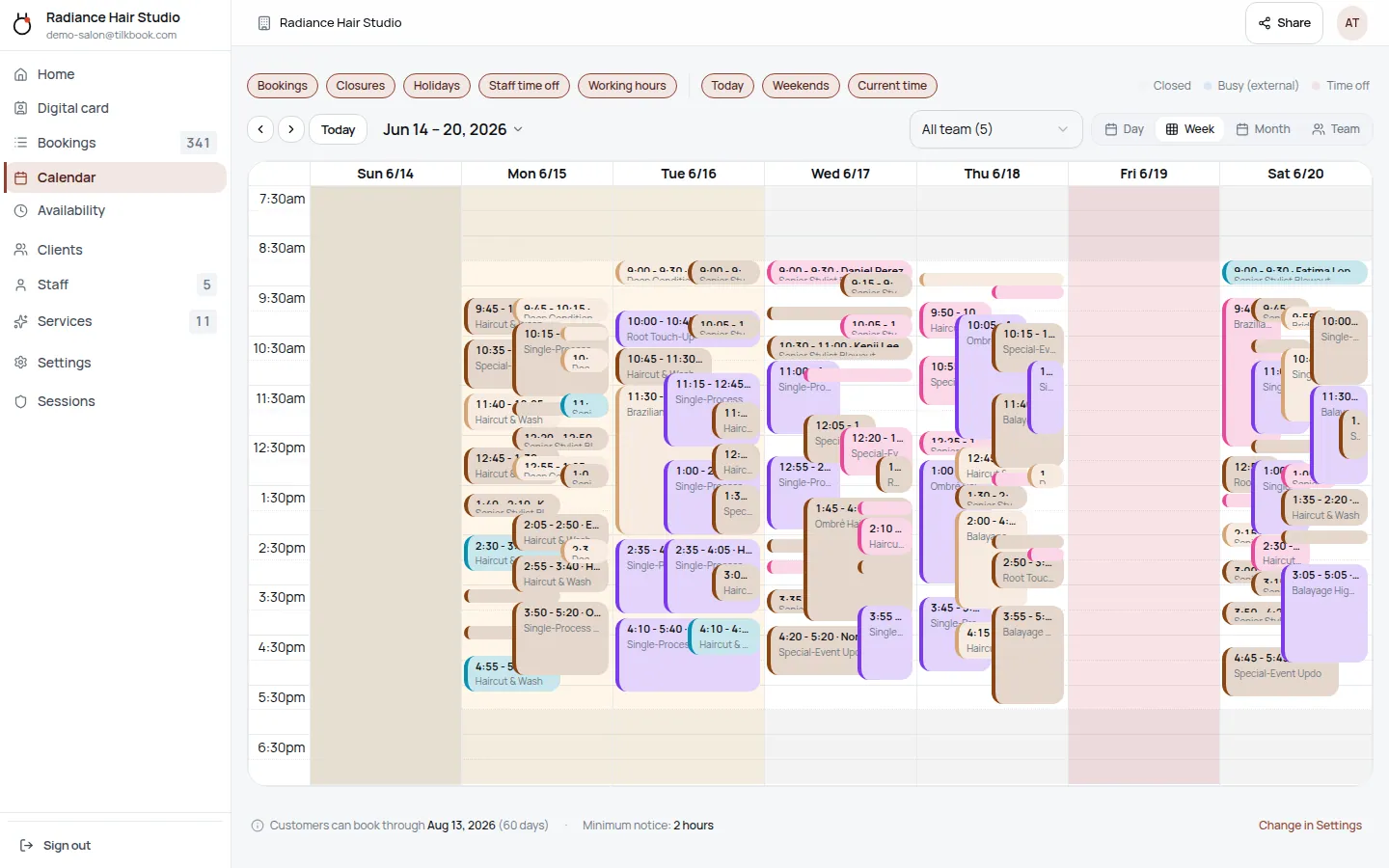
tilkbook is free online appointment scheduling for private tutors and tutoring centres. A tutor creates a public booking page, lists their subjects as separate services — Math Tutoring, SAT Prep, ACT Prep, English Essay Coaching, ESL, IB program support, AP class review — and sets their weekly availability. Students and parents book 24/7 from any device, receive an automated confirmation, and get email reminders before each session. The tutor’s admin calendar shows every upcoming session in a clean week view.
The core scheduling product is genuinely free: unlimited bookings, no credit card required, no per-session cap. Tutors who want to collect a session deposit activate the optional Stripe payments add-on. SMS reminders are available as a paid upgrade on top of free email reminders. Recurring sessions, waitlist, holiday blocking, and the embeddable booking widget are all included at no cost. A solo tutor can go from sign-up to a live booking page in under 15 minutes using the pre-built tutoring template.
Calendly is currently the most common scheduling tool among private tutors — but Calendly’s free tier lacks deposits, no-show fees, and multi-service menus with independent pricing. tilkbook offers all of these at no subscription cost, making it a natural upgrade for tutors who have outgrown a bare-bones Calendly link.
How do recurring weekly slots work for tutoring?
Most tutoring relationships follow a fixed weekly rhythm: a middle school student works with their math tutor every Monday at 4 pm; a high schooler preparing for the SAT meets their tutor every Wednesday and Saturday morning. Re-booking each session individually is friction that accumulates into missed sessions and administrative overhead.
tilkbook’s recurring appointment feature solves this with RRULE-based recurrence. A tutor sets up a student’s weekly slot once — “Every Monday at 4 pm, 60 minutes, Math Tutoring” — and the system books the series automatically. The student (or parent) receives a single confirmation for the full series and individual reminders before each upcoming session. The tutor sees the recurring series on their admin calendar without needing to log any additional bookings.
Adjustments are straightforward. A single session in the series can be rescheduled or cancelled without affecting the rest. March break, exam week, or a one-off conflict can be blocked at the individual-session level. When the recurring series ends — at the end of the academic year, or when SAT prep season concludes — the series is simply stopped without any cleanup required.
A learning centre with multiple instructors running recurring sessions for 30–50 students can manage the full schedule from one admin calendar, with each instructor managing their own availability independently. IB program tutors, AP class reviewers, university entrance prep coaches, and reading comprehension specialists all benefit from the set-once recurring session model.
How does per-subject pricing and service setup work?
A private tutor often teaches multiple subjects at different rates. A math tutor who also offers SAT prep charges more for the SAT prep sessions because of preparation time and resource use. An ESL tutor who offers both conversation practice and formal business English coaching prices them differently.
tilkbook’s service catalog lets a tutor create a separate service entry for each subject and session type — each with its own duration, price, deposit requirement, and staff assignment. A typical tutor’s service menu might look like this:
- Math Tutoring — Grade 9–12 (60 min, $60 per session)
- SAT Prep Session (90 min, $85 per session)
- ACT Prep Session (90 min, $85 per session)
- English Essay Coaching (60 min, $60 per session)
- ESL Conversation Practice (45 min, $50 per session)
- STEM Subject Support — Physics, Chemistry (60 min, $65 per session)
- Study Skills and Academic Coaching (60 min, $55 per session)
Each service can have a different cancellation policy and deposit amount. SAT prep sessions that require significant prep time from the tutor can have a stricter 48-hour cancellation window and a higher deposit than a standard math tutoring session. Clients booking SAT prep see the SAT prep availability; clients booking ESL see only ESL availability.
For a tutoring centre with multiple instructors, each instructor is assigned to the subjects they teach. A student booking AP Physics sees only the availability of the instructor who teaches AP Physics. Staff management handles team-role assignment, so a learning centre director can add new tutors and configure their subjects and availability without rebuilding the booking setup from scratch.
How does parent-and-student booking work?
The most common pattern in private tutoring is the parent books, the child attends. tilkbook’s booking form collects the contact information from whoever submits it — in this case, the parent or guardian. The parent’s email and phone number receive all booking confirmations and reminders, so they can stay informed about their child’s sessions without the student needing their own email account.
The booking form supports custom fields: a tutor can add a field for “Student name,” “Grade level,” “Target exam” (SAT/ACT/IB/AP), or “Subject notes.” These fields appear in the admin booking record so the tutor sees the student’s context before the session begins.
For recurring series, the parent sets up the booking once. Reminders go to the parent’s email — and via SMS if the SMS upgrade is enabled — before each session. A parent with two children booked with the same tutor on different days creates two booking records, each with the relevant student’s details.
How does the waitlist handle test-prep season demand spikes?
SAT prep season (October and January test dates), ACT prep season (October and April test dates), and school exam periods (April–June) create predictable surges in tutoring demand. A tutor whose calendar fills in September with SAT prep clients will have families unable to book in October — and without a waitlist, that demand either dissipates or goes to a competitor.
tilkbook’s waitlist captures overflow demand automatically. When every slot for SAT Prep is booked, a family clicking “Book SAT Prep” is offered the option to join the waitlist. If a cancellation opens a slot — a student drops their prep schedule, a session reschedules to a different time — the system immediately sends a claim link to the first family on the waitlist. The claim link expires after a short window, then moves to the next family.
This means a tutor does not need to maintain a manual cancellation list, send individual texts when a slot opens, or spend time managing the overflow. Test-prep season demand is channelled automatically into available capacity.
Does tilkbook work for online tutoring sessions?
Yes, with a small configuration step. tilkbook handles the scheduling and communication side; the actual tutoring session runs on any video conferencing tool the tutor prefers — Zoom, Google Meet, FaceTime, Microsoft Teams, or any other platform.
To connect the two, a tutor adds the video call link to the service description or to the confirmation email template. Every client who books that service receives the video call link automatically in their booking confirmation. For recurring sessions, the same link appears in every reminder. The student (or parent) clicks the link at the scheduled time and joins the call — no manual link-sharing required for each session.
A university student running online tutoring in reading comprehension and essay coaching for high school students, an SAT prep coach working entirely over Zoom, or a learning centre offering hybrid in-person and online tutoring can run their full schedule through tilkbook regardless of session format.
Can I embed the booking page on a tutoring website or school community board?
Yes. tilkbook’s embed configurator generates the booking widget in four formats: a direct booking link (for email signatures, school community boards, or social media bios), a popup modal triggered by a “Book a Session” button, an inline iframe on any page, and a floating button for a tutoring website.
A private tutor with a simple website can paste the embed code and have a fully functional booking flow without any development work. A tutoring centre can embed each instructor’s individual booking page on a staff directory page, allowing families to browse instructors by subject and book directly from the tutor’s profile page.
The digital business card with NFC-tap lets tutors share their booking page at parent information evenings, school fairs, and community events. Tap the NFC card to a parent’s phone and they land on the booking page immediately, without needing to search for a website or remember a URL.
Questions tutors ask first.
Can a parent book on behalf of their child?
Yes. The booking contact is whoever submits the form — typically the parent or guardian. The parent enters their own email and phone number so they receive all confirmations and reminders. The student's name, grade level, or any other details can be collected via the booking form. The booking is linked to the parent's contact record in the admin dashboard.
Can I set different rates for different subjects?
Yes. Create a separate service for each subject — Math Tutoring (60 min, $60), SAT Prep Session (90 min, $90), English Essay Coaching (60 min, $60), ESL Conversation Practice (45 min, $50). Each service has its own duration, price, deposit setting, and staff assignment. A tutor who teaches Math and English can assign themselves to both; a tutoring centre with multiple instructors assigns each subject service to the appropriate instructor.
Does tilkbook work for online tutoring via video call?
tilkbook handles scheduling and reminders; the video call itself runs through the platform of your choice (Zoom, Google Meet, FaceTime, or any conferencing tool). Include the video call link in the service description or in the confirmation email template — the student receives it automatically in their booking confirmation.
Can I block out school holidays automatically?
Yes. Use the business holidays feature to mark closures — Christmas break, March break, exam week, summer break. Dates marked as holidays show as unavailable on the booking page automatically. Students and parents attempting to book those dates see the closure message instead of available slots.
Try it in your chair.
Set up a real booking page for tutors in under 18 minutes. Free to start — no card.